 Top up Steam

Buy The Outer Worlds — a Steam Gift straight to your account
The Outer Worlds is a first-person sci-fi RPG released in 2019 by Obsidian Entertainment — the studio behind Fallout: New Vegas — and published by Private Division. It's set in Halcyon, a colony system at the very edge of explored space, where you arrive after decades in cryosleep. Corporations run everything here: they sell colonists their food, medicine, jobs and even their funerals, and they're more than happy to squeeze every last bit out of people. The Outer Worlds is a story about whether you play along or break the system from the inside, and on Brawl Games you buy it as a Steam Gift delivered straight to your own account.
The Halcyon system: corporations instead of laws
The setting of The Outer Worlds is a sharp satire of capitalism pushed to its logical extreme: cheerful ad slogans sit right next to open dystopia, and every function a government would normally handle has long since been privatized. You play a hero woken up by accident after decades in stasis, caught immediately between a handful of corporations and a scattering of rebels trying to live by their own rules. The result is a world that's bright, cynical and funny all at once — a rare combination for science fiction about the future.
Build your character: the RPG system behind it
The Outer Worlds is a classic choice-driven RPG with a reactive story. Almost every situation can be solved several ways: talk your way through, intimidate, lie, sneak past, or just open fire. Progression is built around skills and character perks, so you decide who your hero becomes — a silver-tongued diplomat, a stealth specialist, a heavy gunner, or someone who simply charges straight in. The game even rewards unusual playthroughs: you can finish it as a pacifist or leave a trail of wreckage behind you.
Two signature systems deserve a separate mention. The first is Tactical Time Dilation — the ability to stretch a firefight for a few seconds, line up a shot at a weak point and read the battlefield, a side effect of all those years in cryosleep that makes combat noticeably more tactical. The second is the Flaws system: the game offers you a permanent weakness (say, a fear of heights after one fall too many) in exchange for an extra perk point. Few RPGs let you build a hero not only on strengths but on scars — and it's one of the reasons The Outer Worlds gets replayed so often.
Companions with real opinions and dark humor
Companions join you along the way, each with their own backstory, personal quests and opinions about what you do. They react to events, argue with each other, and open up if you give them attention. It's all delivered with Obsidian's signature satirical tone, so conversations in The Outer Worlds rarely feel like filler — almost any exchange can nudge the story in a new direction.
What buying The Outer Worlds as a Steam Gift means
On this page you're buying a Steam Gift for The Outer Worlds, not an activation key. The difference is simple: the game arrives directly in your account through our bot instead of as a code you type in yourself. The bot adds you as a friend, sends the gift, then automatically leaves your friends list once delivery is done — you don't need to accept the friend request manually.
How to order: invite link and accepting the gift
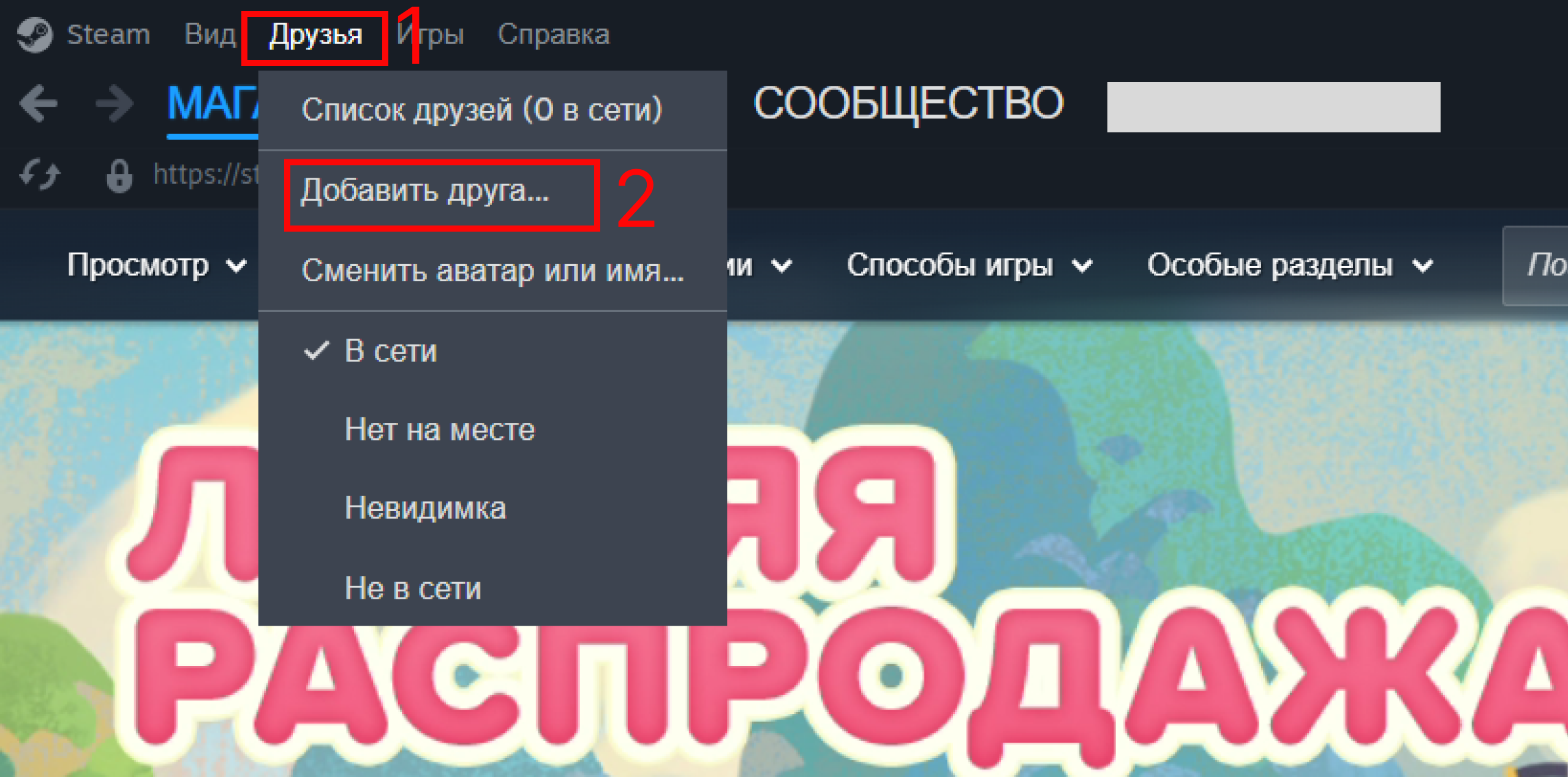
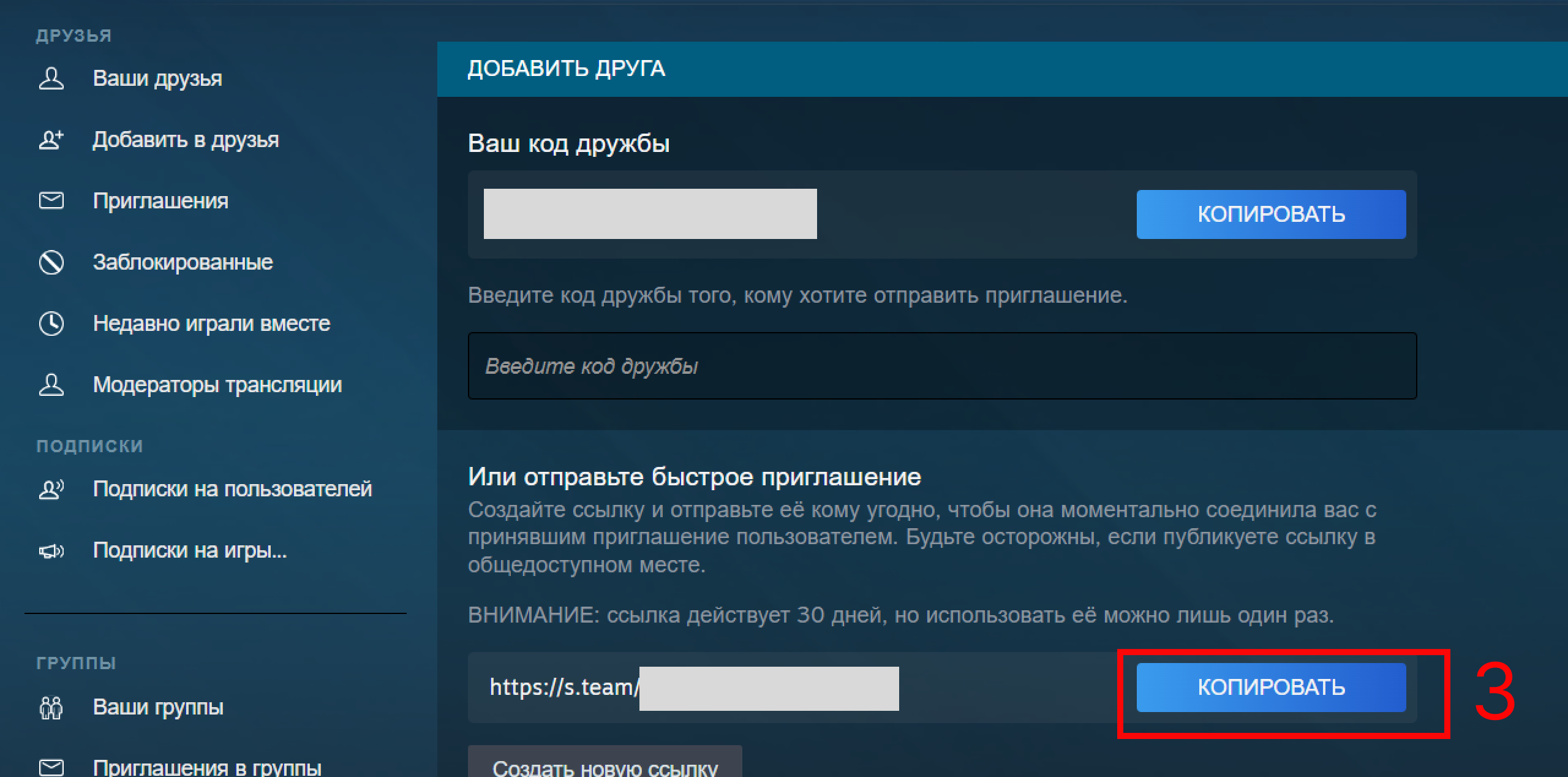
To order The Outer Worlds you'll need a Steam friend invite link: open the Friends section, pick "Add Friend," and grab the "Invite via Steam URL" option — enter that link at checkout. From there the bot takes over: it adds you, sends the gift, and leaves your friends list afterward. Delivery starts shortly after payment, and all that's left for you is to hit "Accept Gift" in your Steam client.
Account region: picking the right The Outer Worlds listing
A Steam gift is always tied to a region, so your account's region has to match the region of the The Outer Worlds listing you bought — you can check yours by the currency shown in your own Steam store. Get the region wrong and Steam simply won't let you accept the gift; in that case the order amount goes to your site balance, and you can immediately place a new order with the correct region. The same thing happens if The Outer Worlds is already in your library — Steam won't let you re-gift a game you already own.
Security: no Steam Guard, no passwords
Receiving The Outer Worlds doesn't require disabling or configuring Steam Guard — your account protection stays exactly as it is. We never ask for your Steam password at any step: the whole delivery is built on a friend invite and Steam's own built-in gifting mechanism, not on logging into anyone's profile.
Refunds for The Outer Worlds: one continuous video
If delivery goes wrong, a refund is only possible under one condition: you have a single, unedited video recording — from the moment you pay for The Outer Worlds to the attempt to accept the gift, with no cuts, no splices, no pauses. Any other case is non-refundable, regardless of the reason. This rule applies to every item in the catalog, not just The Outer Worlds, and we keep it the same for everyone.
Why buy The Outer Worlds from Brawl Games
Brawl Games has been operating since 2023 and accepts payment by Russian bank cards, SBP transfers and crypto — pick whatever's convenient without worrying about third-party fees. Promo codes and site coupons work on The Outer Worlds the same way they do on any other catalog item, and you can check out without registering — all you need is an invite link, a region, and payment.
Similar RPGs in the Brawl Games catalog
If The Outer Worlds' style clicks with you, take a look at Pillars of Eternity II: Deadfire, a large party-based RPG from the same Obsidian with similar attention to dialogue and choice. Another option is GreedFall, where factions and diplomacy work almost like Halcyon's corporations. And fans of turn-based tactics should check out Wasteland 3, a harsh post-apocalyptic RPG with a strong story and a squad of companions.