 Top up Steam

Liftoff®: FPV Drone Racing — a first-person-view racing drone simulator
Liftoff®: FPV Drone Racing isn't an arcade game about toy helicopters — it's a serious first-person-view drone flight simulator by Belgian studio LuGus Studios. The game launched on Steam on September 13, 2018, and has held an “Overwhelmingly Positive” rating ever since: pilots love how believably it recreates the feeling of real FPV flying. The physics are modelled for real — inertia, motor thrust, how the quad behaves in wind and during sharp manoeuvres. If you want to feel what it's like to fly a racing drone without crashing expensive gear in real life, Liftoff is built for exactly that.
What you get
You're buying the full Liftoff®: FPV Drone Racing game, delivered as a Steam gift straight to your account. That's the whole game: racing modes, free flight, multiplayer, the drone builder, the level editor and Steam Workshop access. No cut-down versions — once you accept the gift, the game lands in your Steam library and stays yours for good.
Game modes
- Racing. Run tracks against the clock, fight for the best laps and refine your lines through gates and flags.
- Free Fly. Just fly open environments with no timer — the perfect mode to get used to the controls and physics.
- Multiplayer. Take on other pilots online in real time and see who clears the track fastest.
Build your own quad
Liftoff offers deep customization: you assemble your quadcopter from components, tune the frame, motors, propellers and flight parameters, and dial in the transmitter to fit your hands. This is the part real FPV pilots use to train in the sim before flying an actual drone — the settings carry over into your head and your fingers.
Level editor and Workshop
The game includes a track editor: build your own routes, place gates and publish them to Steam Workshop. You can just as easily download other pilots' tracks, so Liftoff's content is practically endless — the community keeps sharing new maps.
What you need to play
One important point: Liftoff®: FPV Drone Racing requires a gamepad or radio transmitter. You can't properly fly the drone on a keyboard — that's a deliberate design choice for realism. Any Steam-compatible controller works, and for full immersion many players connect a real FPV transmitter. The game officially runs on Windows, macOS and SteamOS/Linux.
How we deliver the gift
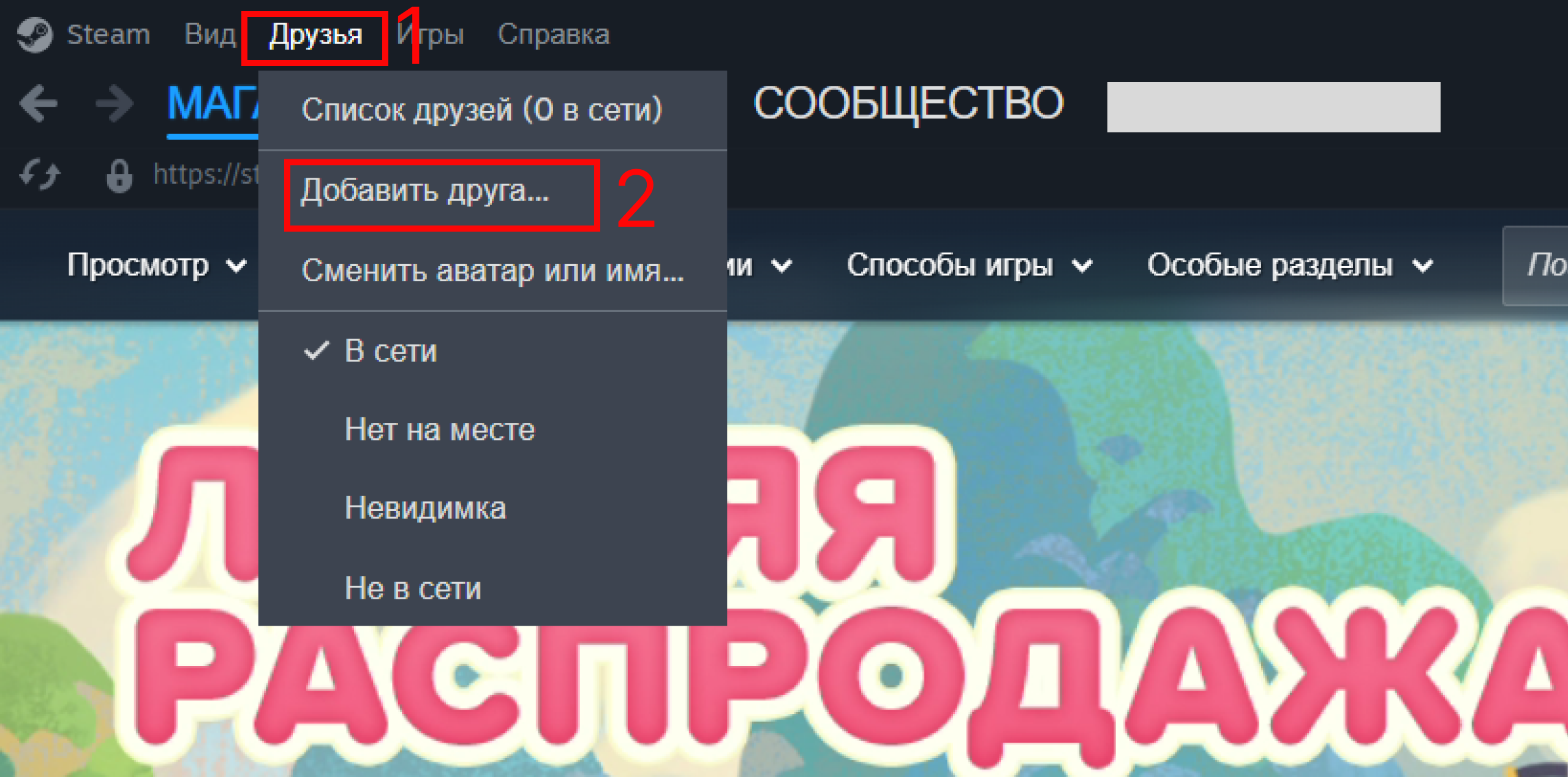
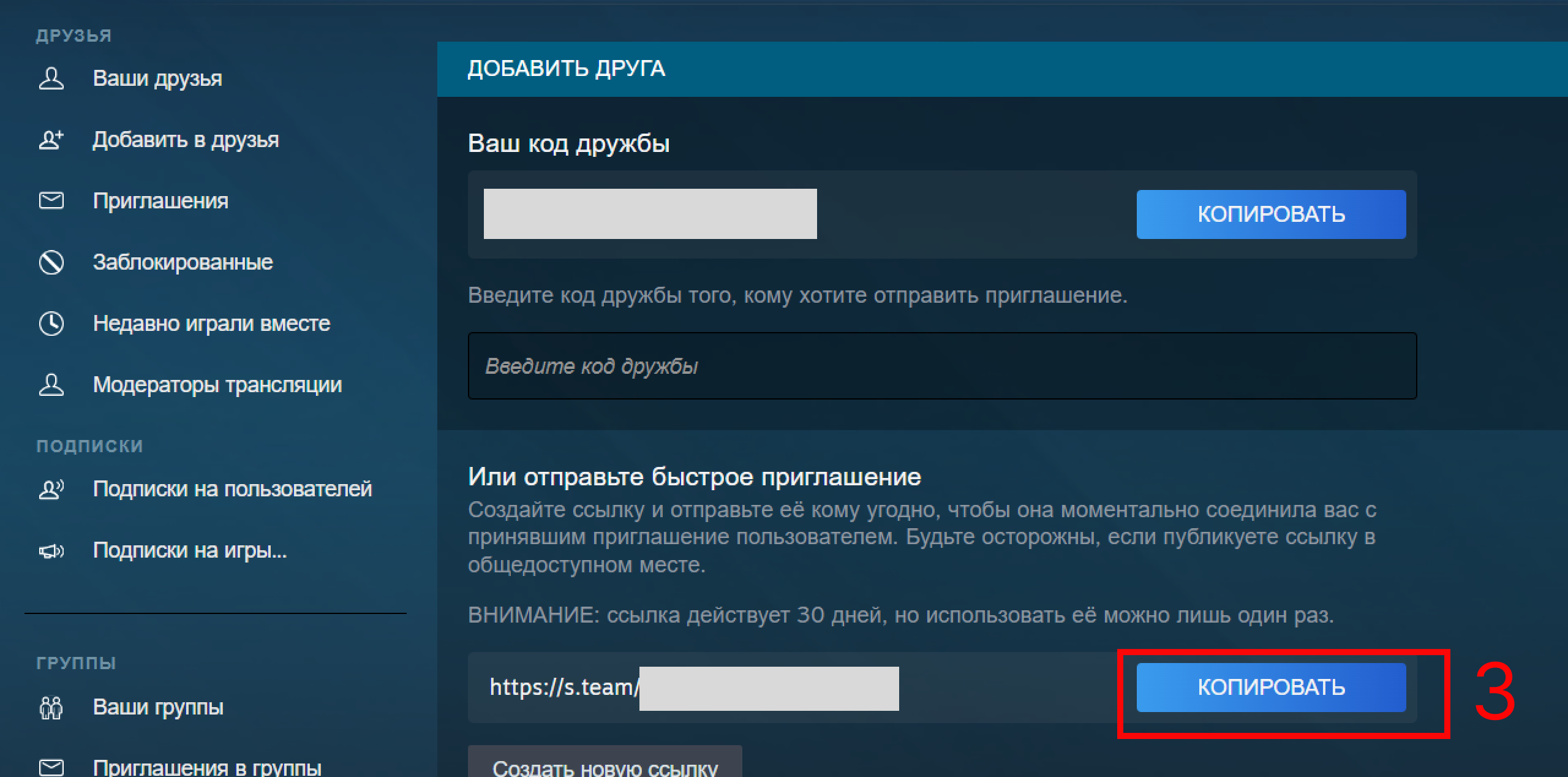
We send Liftoff as a Steam Gift through a bot. We need two things from you: your Steam friend invite link and your account region. Everything else is automatic — the bot adds itself as your friend, sends the gift (usually within a couple of minutes) and leaves your friends list after delivery. You don't accept anything, and Steam Guard isn't required to receive it.
Important region and library conditions
For Steam to accept the gift, two conditions must line up. First, your Steam account region must match the gift region — so enter your real region when ordering. Second, you must not already own Liftoff®: FPV Drone Racing: Steam won't let you accept a gift for a game you already have. If both conditions are met, receiving it is smooth. And don't forget to allow friend requests in your privacy settings, otherwise the bot can't reach you.
Who will enjoy Liftoff
If you like honest, skill-driven simulators that lean on physics, check out other games of this kind in our catalogue: Trackmania for fans of fast time-trial racing, Assetto Corsa for the realistic-sim crowd, and Microsoft Flight Simulator for those drawn to the skies. Liftoff sits in its own niche between them — it's about speed, precision and the thrill of first-person flight.
Why a simulator instead of a real drone
A real FPV drone is expensive and comes with the constant risk of crashing it on your very first training run. Liftoff removes both problems: you fly as much as you want, crash without consequences and build the muscle memory that carries over to real flights. Many pilots use the game as a trainer between actual flights, while others stick around purely for the thrill of racing and the gorgeous community-made tracks.
Quick answers
Do I need a controller? Yes, no flying without a gamepad or transmitter. Do I need Steam Guard? No. Do I accept the friend request? No, the bot handles everything. What if I already own the game? Then you can't accept the gift — check your library first. Other details are covered in the questions section on this page.