 Top up Steam

Global Rescue — Your Emergency Service on a Real-World Map
Global Rescue is a simulation-strategy game about running emergency services, made by PeDePe GbR and published by Aerosoft GmbH. It launched in Steam Early Access on April 27, 2026. You don't control a single hero here — you build and grow your own emergency base: hire staff, buy vehicles and command firefighters, police, EMS and even SWAT. The heart of the game is the dispatch desk: calls keep coming, and it's up to you to decide who to send where to make it in time.
The standout feature of Global Rescue is its real-world map data. You can set up your service almost anywhere: your hometown, a capital city, or any metropolis on the other side of the planet. Familiar streets, real layouts and recognizable geography make every shift feel genuinely yours.
What you get with your purchase
You're buying the full base version of Global Rescue for Steam in Early Access form. This isn't a demo or a trimmed-down build — it's the same game sold on Steam, with all current content. Because the project is in Early Access, updates (new missions, vehicles, fixes) land in your library automatically as they release.
- 🚒 A complete emergency base that you build and upgrade from scratch.
- 🗺 Free choice of location anywhere in the world based on real maps.
- 🚓 Several unit types: fire department, police, EMS, SWAT.
- 🔧 A research tree: upgrade vehicles, train staff, expand your base.
What the gameplay is made of
At the start of Early Access the game ships with over 200 missions and side objectives, plus 23 different vehicles — from fire engines to police and medical units. You're not just putting out fires: between calls you manage your base economy, train employees, upgrade transport and plan how to expand through the research tree. It's measured management with tense peaks when several calls hit at once.
Mods and Steam Workshop
Global Rescue supports modding through the Steam Workshop right from Early Access. Players create and share their own vehicles, skins and missions, so the game's content grows thanks to the community, not just the developers. If the core loop clicks for you, the Workshop will keep things fresh for a long time.
Where to play: PC, Mac and Steam Deck
This is a Steam game. Windows and macOS are officially supported. You can also run Global Rescue on Steam Deck, but keep in mind the project is in Early Access and some features may not be fully supported on Deck. Checking the system requirements on the Steam page before buying is a good habit.
How we deliver the game: Steam gift
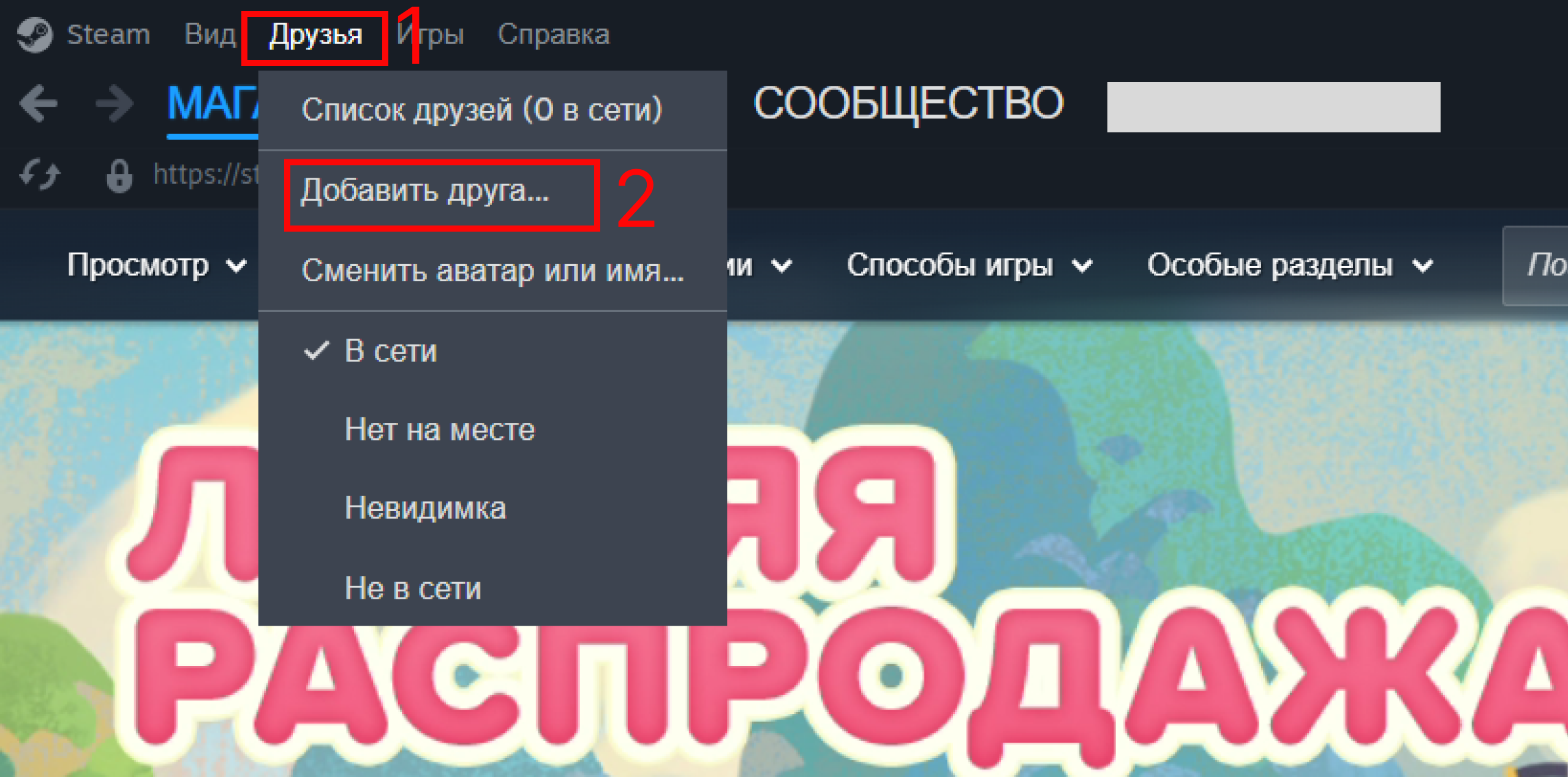
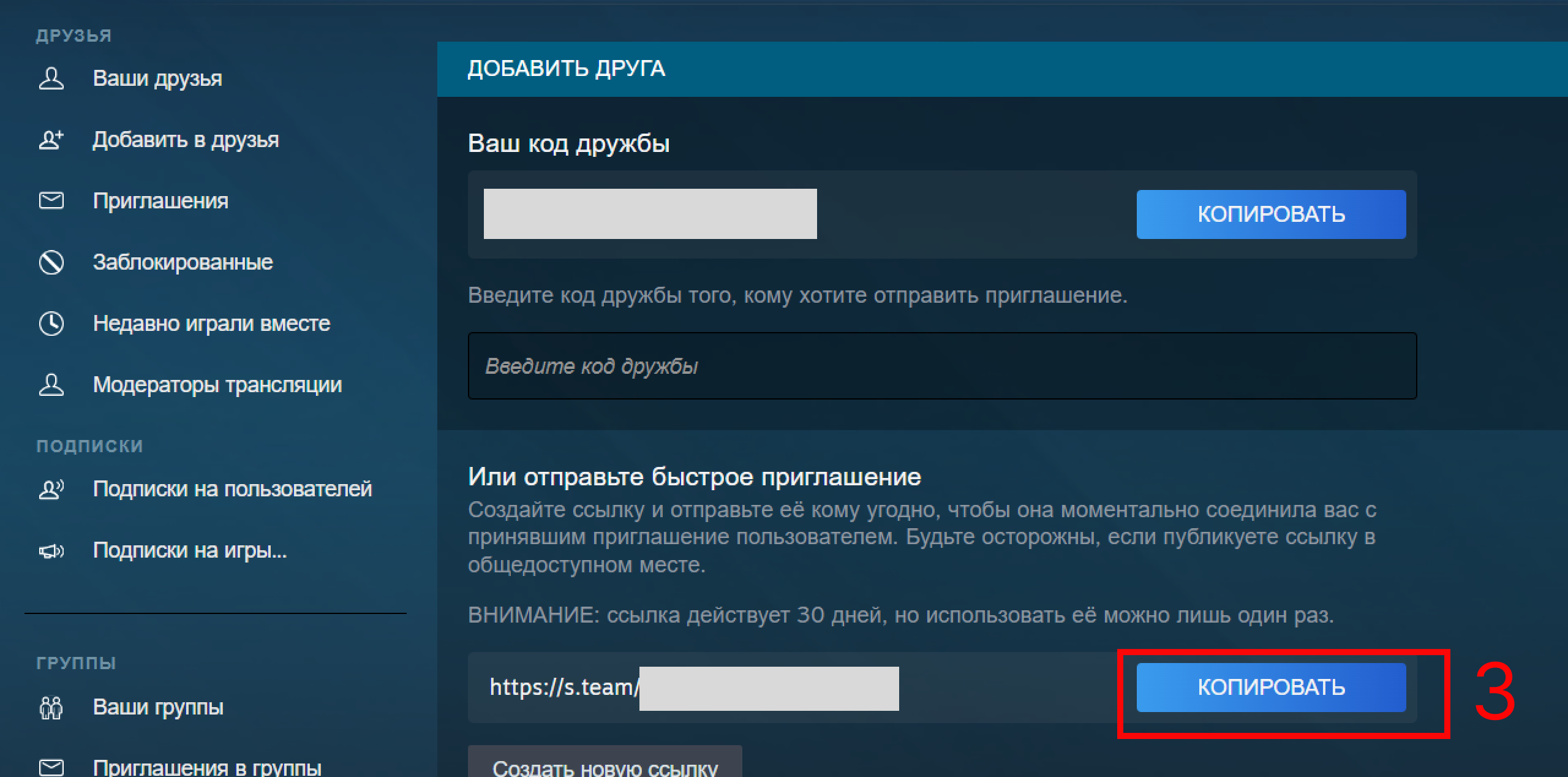
Global Rescue is delivered as a Steam Gift through our bot. You only need to provide two things: your Steam friend invite link and your account region. Everything else happens automatically: the bot adds itself to your friends, sends the gift (usually in a couple of minutes), and leaves your friends list once delivery is done. You don't need to accept the friend request, and Steam Guard is not required to receive the gift.
The gift region is important
The gift is regional, so your Steam account region must match the gift region — otherwise Steam simply won't let you accept it. One more condition: Global Rescue must not already be in the recipient account's library, because Steam won't allow a gift for a game you already own. These are the most common reasons a gift fails to go through, so check your region and library before paying.
What to do if something goes wrong
If the bot couldn't add you as a friend, it's usually because friend requests are blocked in your profile's privacy settings, or the invite link expired. Enable friend requests, refresh the link and contact us — we'll help finish the delivery. Failures are rare, as with any service like this, and we try to resolve them quickly.
Similar games in our catalog
Into management sims and strategy? Take a look at Cities Skylines II if you prefer city-building and urban management, or Police Simulator: Patrol Officers for a first-person take on emergency services.
Global Rescue is a great pick if you enjoy calm yet demanding management with a living world map and a steady stream of calls. Grab the gift and send your rescue service out on duty. 🚨