 Top up Steam

Command: Modern Operations — modern warfare under full control
Command: Modern Operations (CMO) isn't an arcade shooter — it's a serious military simulator from the Command development team, published by Matrix Games and Slitherine. You don't run around with a rifle; you sit at the command desk: plan operations, launch aircraft, deploy fleets, read radar contacts and decide when to fire missiles. The game launched on Steam on November 14, 2019, as the direct successor to the legendary Command: Modern Air/Naval Operations, which collected a pile of "Wargame of the Year" awards.
Here you buy the full base game delivered as a Steam gift: our bot adds itself to your friends, sends CMO straight to your account and then leaves. Below we break down what the base game includes, how it differs from the paid campaign DLC, how the gift delivery works and which Steam details to watch so everything goes smoothly.
What the game is and why it stands out
CMO models modern conflicts from the post-WWII era through today and the near future. The scale runs from a single interceptor to a full operation with carrier groups, submarines, ground-based air defence and satellite reconnaissance. Under the hood sits the huge DB3000 weapons database: thousands of real aircraft, ships, missiles, sensors and radars with their actual characteristics. Detection ranges, hit probabilities, electronic-warfare reach — everything is computed by a believable model rather than guessed. That depth is exactly why the Command engine, in its professional edition, is used well beyond entertainment.
Gameplay runs in real time with the option to pause and issue orders calmly. You set routes, altitude bands, rules of engagement and target assignments — then watch whether your plan survives contact with the enemy. This is a game about thinking, patience and working with information, not reflexes.
What the base game includes
The base version of Command: Modern Operations gives you:
- the full simulation engine with sensor, weapon and electronic-warfare modelling plus flight/movement physics;
- the DB3000 weapons database — thousands of platforms and systems from around the world;
- the built-in scenario editor to build your own operations from scratch;
- a set of ready-made missions and tutorial scenarios to get started;
- analysis tools: replays, an event log and post-mission debriefs.
That's enough for dozens or hundreds of hours without buying anything extra: the editor and community scenarios alone offer huge replayability.
Base game vs campaign DLC: don't mix them up
Command: Modern Operations has plenty of paid add-ons — story campaign packs such as Desert Storm, Falklands, Northern Inferno, Kashmir Fire, Chains of War and dozens more. They are NOT part of this gift. You get the base game, and you can buy campaigns separately as DLC later in your own Steam. So if you've seen flashy trailers for "Desert Storm," that's separate content layered on top of the base, not part of this product.
How the gift is delivered
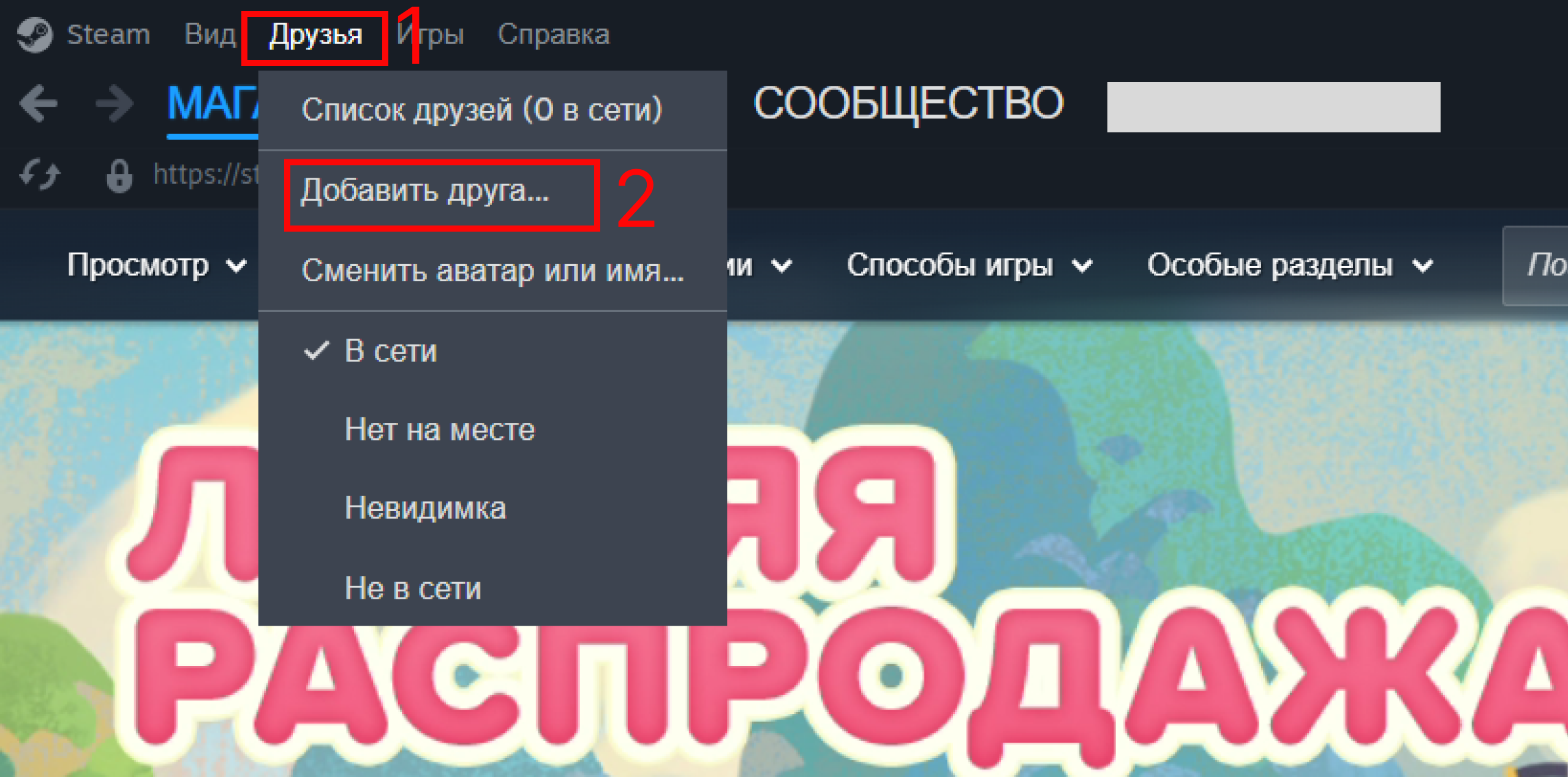
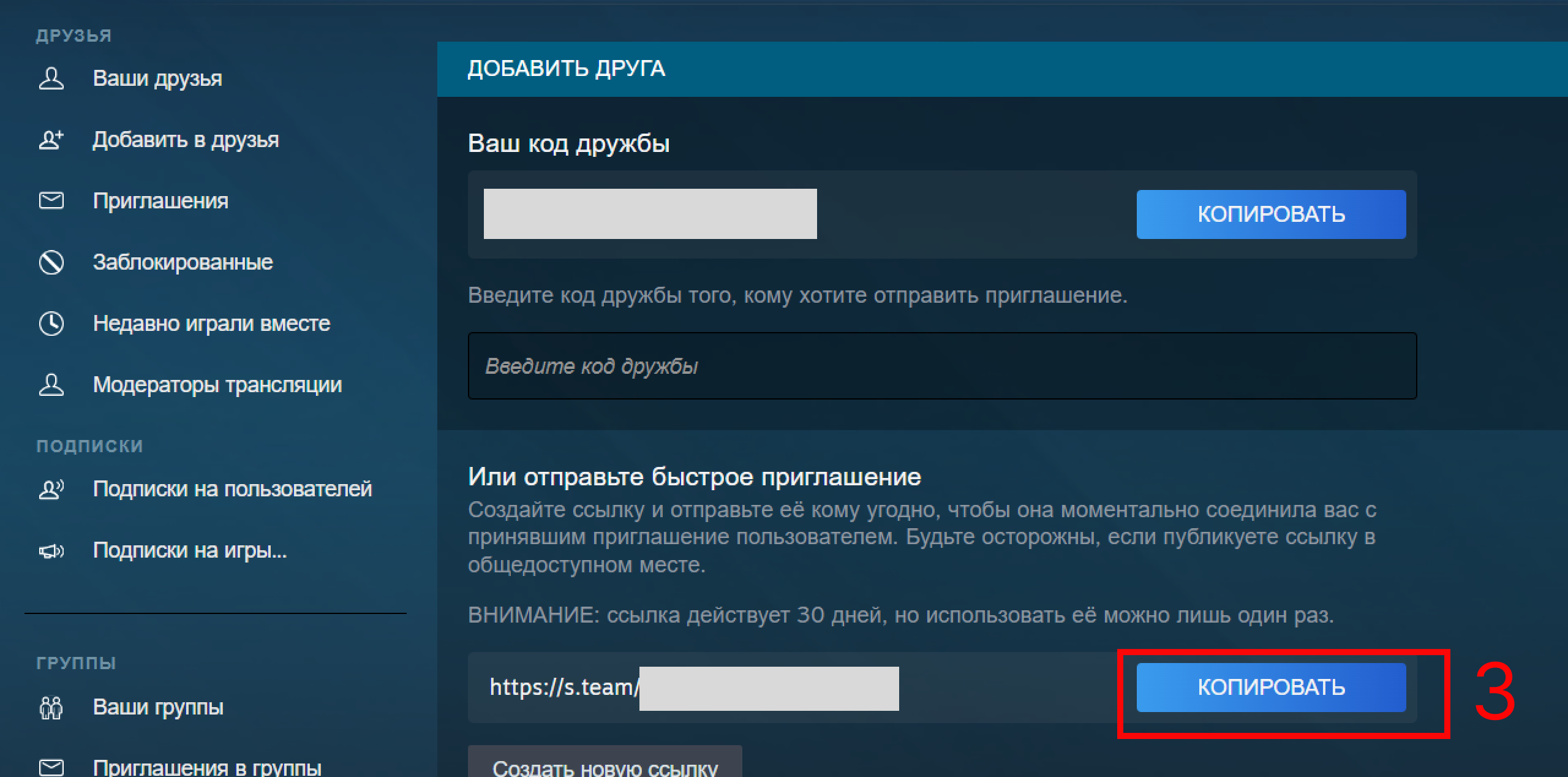
We deliver CMO as a Steam Gift, not as a key. The flow is simple: you leave your Steam friend invite link and your account region. After payment our bot adds itself to your friends, sends the gift (usually within a couple of minutes), and removes itself from friends after delivery. You don't need to accept the friend request manually — the bot handles everything. Steam Guard is not required to receive the gift.
Two conditions Steam needs to accept the gift
To get delivery right the first time, check two things:
- Region matches. Your Steam account region must match the gift region — otherwise Steam simply won't let you accept it.
- You don't already own the game. If Command: Modern Operations is already on the account, you can't accept a gift for it — that's the most common cause of failure. Use an account that doesn't own the game yet.
Also make sure friend requests are allowed in your Steam privacy settings and the invite link is fresh — then the bot connects without trouble.
Where to play
CMO is a Windows PC game. On Steam Deck and Linux it runs through the Proton compatibility layer, but there's no official native support, so the experience depends on your setup. No gamepad needed: it's all mouse, map and order menus, just like a real command centre.
Who it's for
If you enjoy thoughtful strategy and military hardware, and you're happy reading missile stats instead of shooting at point-blank range, CMO will almost certainly pull you in. If you'd rather have a boots-on-the-ground military experience, take a look at Arma 3; if you love grand strategy on a global map, check Hearts of Iron IV. And if you want even more vehicle-and-aircraft simulation, drop by War Thunder. Command: Modern Operations is about cold calculation and large-scale operations, where the better-prepared side wins.